How we reviewed this product
This review is research-led and based on current provider documentation, pricing pages, offer terms and product materials. We have not described long-term product use or service quality as personally tested. Always check the live provider page before buying, because pricing, features and promotions can change.
Our verdict
WordPress - the short version
WordPress.com is a strong managed option for businesses that want the flexibility of WordPress without separately arranging hosting, security and platform updates. Its paid plans now allow plugin installation, while Business and Commerce add more advanced backup and developer capabilities.
The main buying decision is understanding the difference between WordPress.com and self-hosted WordPress, then choosing a plan that matches the level of control and ecommerce functionality you need.
This WordPress review focuses on WordPress.com. For a very simple brochure website, a more guided builder may be quicker to learn. For a business that wants a large content library, specialist plugins, developer access or room to evolve, WordPress.com's broader ecosystem can justify the extra learning curve.
Overall, WordPress.com offers a useful middle ground between a closed DIY builder and fully self-managed WordPress hosting. The right plan depends on storage, backups, developer access, ecommerce and support requirements, so businesses should choose on capability rather than assuming the plan labelled Business is automatically necessary.
At a glance
- Best for
- Service type
- Free option
- Current annual-billing monthly equivalents
- Plugins
- Domain
- SSL
- Backups
- Ecommerce
- Current offer
- Support
Current offer
US$25 referral credit toward a qualifying annual WordPress.com plan*
The Business Kit's current WordPress referral link provides a US$25 promotional credit for a new customer who purchases a qualifying annual WordPress.com plan. WordPress.com's current referral terms say monthly plans are not eligible and the referral credit cannot be combined with other credits or discounts. The credit is applied to the qualifying annual-plan purchase through the referral journey. There is no manual promo code. Confirm the credit is shown before completing payment. Do not describe the US$25 credit as cash, a guaranteed £ equivalent or a recurring discount.
How to claim the WordPress offer
Overview
WordPress.com vs WordPress.org - what are you actually buying?
The first job of a useful WordPress review is to separate the WordPress software from WordPress.com. WordPress itself is open-source content-management software. It can be installed with many different hosting companies. WordPress.com is a commercial managed service that hosts WordPress for you and bundles the hosting environment, platform management and a set of WordPress.com features into its plans. That distinction affects almost every buying decision.
With self-hosted WordPress, the business chooses a hosting company, installs or migrates WordPress and takes more responsibility for backups, security, performance and server-level decisions. With WordPress.com, more of that infrastructure is managed as part of the service. You still build and operate a WordPress website, but you are buying it inside WordPress.com's managed environment. For a small business, this can remove a significant amount of technical administration while preserving access to WordPress's familiar page, post, theme and plugin model. Current paid WordPress.com plans support plugins, which means the gap between the managed service and conventional self-hosted WordPress is narrower than many older comparisons suggest.
The trade-off is that WordPress.com has its own plan structure, feature limits and commercial terms. Some advanced backup, developer and ecommerce capabilities sit on higher plans. Businesses also need to distinguish WordPress.com support from support for every third-party plugin or theme they install. Neither model is universally better. A business that values managed infrastructure may prefer WordPress.com. A developer who wants maximum freedom over hosting architecture may prefer self-hosting. This WordPress review treats that choice as a strategic decision rather than presenting WordPress.com as simply another visual website builder.
Day-to-day
Ease of use and the WordPress learning curve
WordPress.com removes much of the hosting administration, but WordPress itself still offers more choices than a simple drag-and-drop builder. Pages, posts, themes, plugins, menus, blocks, users and settings give the platform flexibility, while also creating a learning curve for somebody building their first website. For a basic site, the guided editing experience can get a business online without coding. As the site becomes more customised, the owner may need to understand themes, plugin settings and how different parts of WordPress interact. That is the price of having a platform that can grow beyond a fixed brochure-site template.
The managed WordPress.com environment helps by taking care of the underlying hosting and core platform layer. That can make day-to-day ownership easier than running WordPress on a server you manage yourself. This WordPress review therefore sees ease of use as relative. WordPress.com is easier operationally than self-managing hosting, but it can be more involved editorially than a highly constrained website builder. Businesses should decide whether they value immediate simplicity or longer-term flexibility more. A WordPress review should therefore judge usability against the level of flexibility the business actually needs.
Reliability
Performance and reliability
With WordPress.com, hosting performance is part of the managed service rather than something the business configures from scratch. That removes decisions about server software and much of the underlying hosting stack. Website speed still depends on what the business adds. Large images, advertising scripts, third-party embeds, complex themes and poorly chosen plugins can all affect the experience even when the hosting platform itself is managed. A WordPress review should not treat 'managed hosting' as a guarantee that every WordPress site will automatically be fast.
The practical advantage is that WordPress.com controls more of the infrastructure and can manage platform-level optimisation and updates. The practical responsibility for the owner is to keep the site itself disciplined: use reputable plugins, optimise media and avoid unnecessary functionality. For businesses where uptime or transaction performance is critical, review the current service commitments and plan capabilities directly. A high-traffic publication or ecommerce store has different performance requirements from a five-page local-business website.
Growth
Scaling a WordPress.com business website
WordPress's biggest strategic strength is that a site can evolve substantially without abandoning the underlying content-management system. A small professional-services website can grow into a large resource library, membership proposition, publication or ecommerce operation through themes, plugins and developer work. WordPress.com supports that progression through its paid plans, with Business and Commerce providing more advanced developer and backup features. That gives a growing company room to add functionality while retaining managed hosting.
Growth can also create complexity. Every plugin, integration and custom feature becomes another dependency to maintain. A site that begins as a simple marketing presence can eventually require professional development support even though WordPress.com continues to manage the infrastructure. This WordPress review therefore recommends planning for the likely future site, not just the launch version. If the business expects significant content growth or specialist functionality, WordPress's extensibility can be a major advantage. If the site will always remain extremely simple, that flexibility may be more than is needed. For that reason, this WordPress review treats scalability as a balance between the platform's extensibility and the management burden created by additional functionality.
Exit planning
Leaving WordPress.com and long-term portability
Portability is one of the stronger arguments for choosing a WordPress-based platform. WordPress content can be exported, existing WordPress sites can be migrated into WordPress.com, and eligible higher-plan backup tools provide additional routes for preserving site data. Moving a complex site is still a project rather than a button press. Plugins, ecommerce orders, users, media, DNS, email, redirects and custom code may all need attention. The destination host also needs to support the features the website relies on.
The important distinction from many closed builders is that the business is working with the widely used WordPress content system. That generally gives developers and hosting providers more familiar migration routes if the business later wants to self-host or move to another WordPress host. Before cancelling, download appropriate exports or backups, confirm domain control and plan the DNS and email transition. This WordPress review treats portability as a long-term benefit, but only if the business maintains access to its accounts and plans the move before the old service ends. This WordPress review considers that portability an important distinction when comparing WordPress.com with more closed website-building systems.
Pricing
WordPress review: pricing and plans
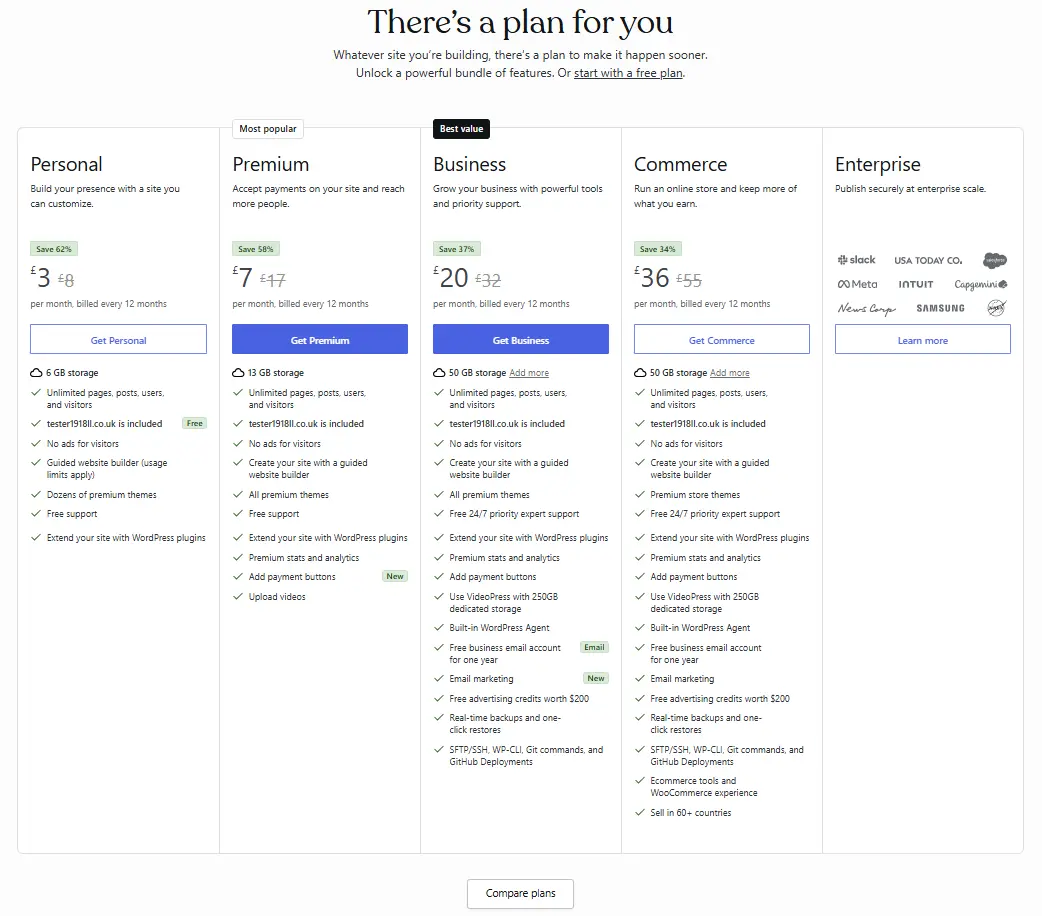
WordPress.com currently offers a free service plus Personal, Premium, Business and Commerce paid plans, alongside Enterprise. WordPress.com currently offers monthly, annual and multi-year billing options. Prices vary by currency, billing term and promotion, so this WordPress review uses the live WordPress.com pricing page as the authority rather than hard-coding a permanent UK price. The screenshot shows Personal with 6 GB storage, Premium with 13 GB, and Business and Commerce with 50 GB. It also shows plugin support across these paid plans.
Confirm live fees on the official pricing page.
| Plan | Standard / promo price | Notes | Best for |
|---|---|---|---|
| Personal | About £3/mo on annual billing (supplied screenshot) | 6 GB storage; plugin support | Simple sites with fewer advanced tools |
| Premium | About £7/mo on annual billing (supplied screenshot) | 13 GB storage; more themes; payment buttons | Growing content sites |
| Business | About £20/mo on annual billing (supplied screenshot) | 50 GB storage; real-time backups; SFTP/SSH; developer tools | Most serious small business WordPress.com builds |
| Commerce | About £36/mo on annual billing (supplied screenshot) | 50 GB storage; WooCommerce store tooling; ecommerce features | Online stores on WordPress.com |
How to read WordPress.com pricing
Business adds more advanced hosting and developer functionality, including real-time backups and one-click restores, SFTP/SSH, WP-CLI, Git commands and GitHub Deployments. Commerce builds on that with ecommerce tools and a WooCommerce experience.
Prices, discounts and plan features can change. The practical approach is to choose based on required features and the live checkout total rather than assuming a business automatically needs the plan called Business. Enterprise is a sales-led tier for larger organisations and is outside typical small-business self-serve checkout.
Hosting
Managed hosting on WordPress.com
Hosting, SSL and core platform updates are part of the plan. You do not manage servers directly. Storage allowances rise from Personal through Business and Commerce in plan materials.
For many owners, that managed layer is the reason to choose WordPress.com in a WordPress review rather than self-hosting on cheap shared hosting.
Themes and plugins
Themes, plugins and customisation
A major change relevant to a 2026 WordPress review is that WordPress.com currently allows plugin installation on all paid plans: Personal, Premium, Business and Commerce. Free sites need to upgrade. Plugins extend WordPress with functionality such as forms, bookings, memberships, SEO features and integrations. Third-party themes can also change the site's design and layout.
Flexibility creates responsibility. Every extra plugin introduces another dependency, so choose reputable software, remove unused plugins and keep the site maintainable. WordPress.com provides managed infrastructure, but it cannot guarantee the quality of every third-party extension. If your site needs a specific plugin stack, this WordPress review recommends verifying plugin install rights on the plan you buy before you migrate content.
Domains
Domains and email
WordPress.com plans often include a free domain period for eligible annual purchases. Business email is marketed as a free year on higher tiers in plan grids.
Domain connect and bring-your-own-domain flows appear during signup. Treat domain renewal as a recurring cost after any free period.
Security
Backups, security and performance tools
Higher tiers advertise real-time backups, one-click restores, SFTP/SSH, WP-CLI and related developer tools. Ad-free visitor experiences also appear from Premium upward in many grids.
A WordPress review should match backup and developer needs to Business or Commerce rather than assuming every plan includes them.
Ecommerce
Ecommerce and payments
Payment buttons appear earlier in the ladder; Commerce is the store-focused plan with WooCommerce experience messaging, multi-country selling and ecommerce tooling in plan materials.
If selling products is core, this WordPress review points you to Commerce rather than Personal.
Support
Support and refunds
Support depth rises with plan level, with priority expert support marketed on Business and Commerce. Refund windows and trial-style policies are set by WordPress.com and should be read on the live site.
This WordPress review does not invent refund timings. Check current WordPress.com policies before you pay annually.
Onboarding
Sign-up and domain selection
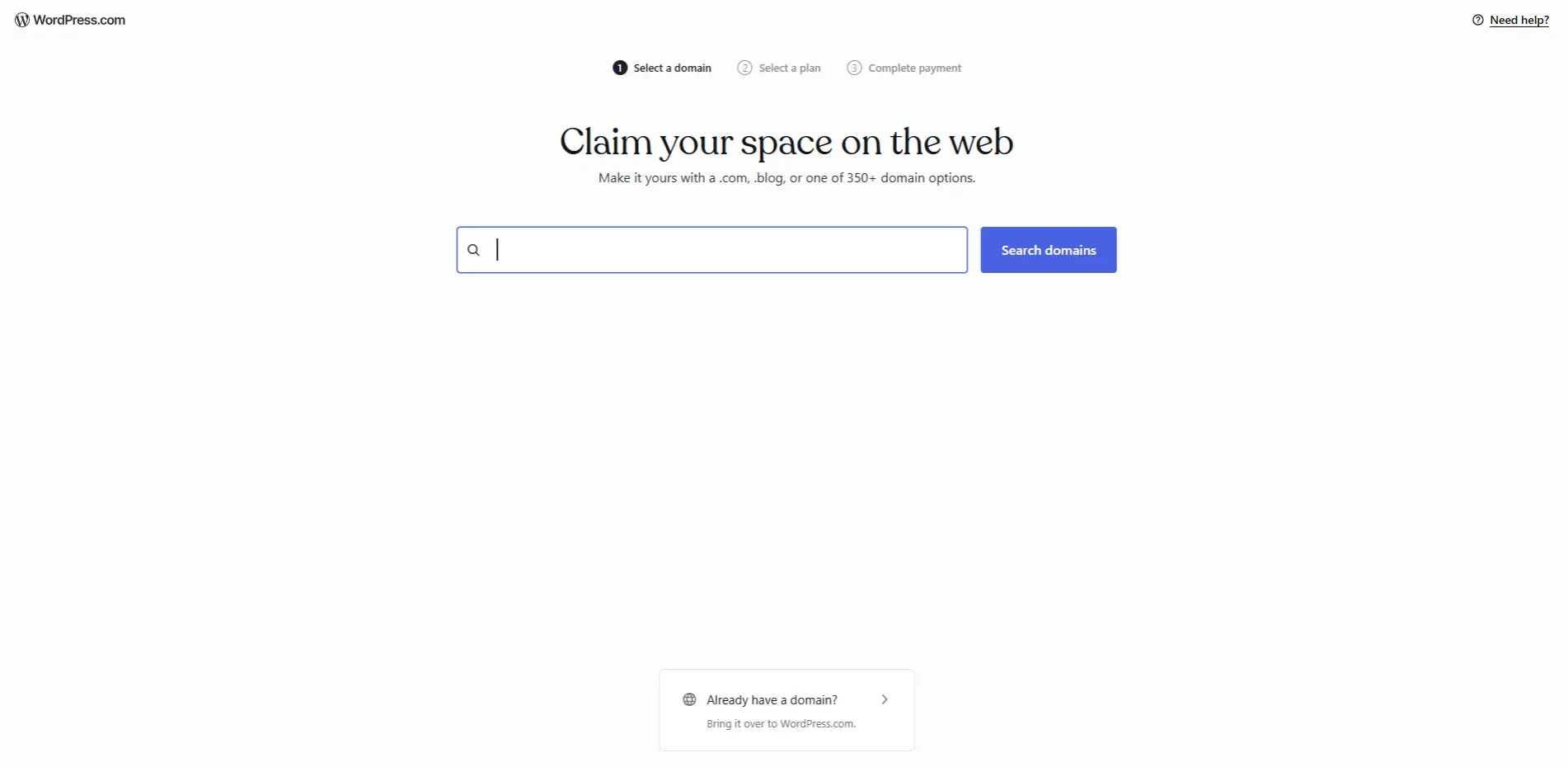
The WordPress.com flow typically moves from domain search to plan selection to payment. You can search for a new domain or bring an existing one across.
Use the domain-step screenshot in this WordPress review as a visual of onboarding only, not as proof of timed first-hand testing.
Who it suits
Who WordPress.com may suit
May suit
May be less suitable for
Pros and cons
The balanced view on WordPress
Pros
Cons / points to check
Alternatives
Other website and hosting options
- Self-serve hosting where you install WordPress yourself at a lower promotional hosting rate.
- Done-for-you website service if you do not want to build or manage WordPress yourself.
You can also compare all website hosting options on the Website & Hosting hub.
WordPress offer details and eligibility
This WordPress review uses the tracked referral URL for a US$25 WordPress referral credit on a qualifying annual WordPress.com plan. There is no manual code to type. Monthly plans are not eligible and the referral credit cannot be combined with other credits or discounts.
WordPress.com decides which plans qualify, how the credit is applied and whether the promotion is available in your currency. Read the referral landing page and checkout summary before you pay. For the full offer details, see our WordPress discount page.
FAQs
WordPress frequently asked questions
+
WordPress.com is a managed website and hosting service built on WordPress software. Hosting, security infrastructure and platform updates are included.
+
No. WordPress.org provides open-source WordPress software for self-hosting. WordPress.com hosts and manages WordPress as a service.
+
WordPress.com has a free option with limitations. Paid Personal, Premium, Business and Commerce plans add more features.
+
Yes. As of the current 2026 plan guidance, plugin installation is available on all paid WordPress.com plans.
+
Yes. Paid plans can use connected domains, and annual or multi-year plans currently include the first year of an eligible new domain.
+
Yes. SSL is included for WordPress.com sites.
+
The supplied current pricing screenshot shows one free business email account for one year on Business and Commerce. Personal and Premium do not show the same inclusion, so check the live plan before buying.
+
WordPress.com protects site data, while direct automated backup and restore functionality is available on eligible higher plans such as Business and Commerce.
+
It provides solid technical and publishing foundations and supports SEO tools and plugins on paid plans. Rankings still depend on content, competition, authority and wider SEO work.
+
Yes. The Commerce plan uses WooCommerce and includes a broad set of online-selling features.
+
Yes, there are export and migration routes. The exact process depends on your plan, plugins, themes and store data.
+
Yes. You can cancel a subscription to stop renewal. Removing a plan immediately can affect features, so back up or export what you need first.
+
Refund periods vary by product. Current guidance includes a seven-day window for monthly plans and a 96-hour window for eligible domain cancellations, with other rules applying to other purchases.
+
A new customer using a valid referral link can receive a US$25 credit toward a qualifying annual WordPress.com plan. Monthly plans are not eligible under the current referral terms.
Sources, methodology and last reviewed
Sources used for this WordPress review include WordPress.com plan-features, hosting, plugins, backups, refunds and referral-credit documentation, plus The Business Kit comparison methodology.
We compare providers using practical factors that matter when choosing a business product or service, including price, features, eligibility, ongoing costs and the type of business each option may suit. We do not rank a provider simply because it pays us a commission. Provider information can change, so check the latest terms before applying or buying.
Last reviewed:
Reader-supported: we may earn a commission if you buy through links on this page, at no extra cost to you. This does not affect how providers are presented.